Octal Number System
Octal Number System: Complete Guide to Base-8 in Computing
Introduction to the Octal System
Before hexadecimal became the dominant shorthand for binary in modern computing, there was octal—the base-8 number system. While it has largely been replaced by hex in contemporary applications, octal played a crucial role in the early days of computing and remains relevant in specific niches today, most notably in Unix and Linux file permissions.
The octal system uses only eight digits (0 through 7) to represent all numerical values. Its primary advantage, like hexadecimal, is its direct relationship to binary. Since $8 = 2^3$, exactly three binary bits map perfectly to one octal digit. This made octal an ideal shorthand for early computers that used 12-bit, 24-bit, or 36-bit word lengths, which are all divisible by 3.
Understanding octal is essential for anyone working with legacy systems, Unix-based operating systems, or studying the history of computing. This comprehensive guide will explore the base-8 system, conversion techniques, and the practical applications where octal still thrives today.
What is the Octal Number System?
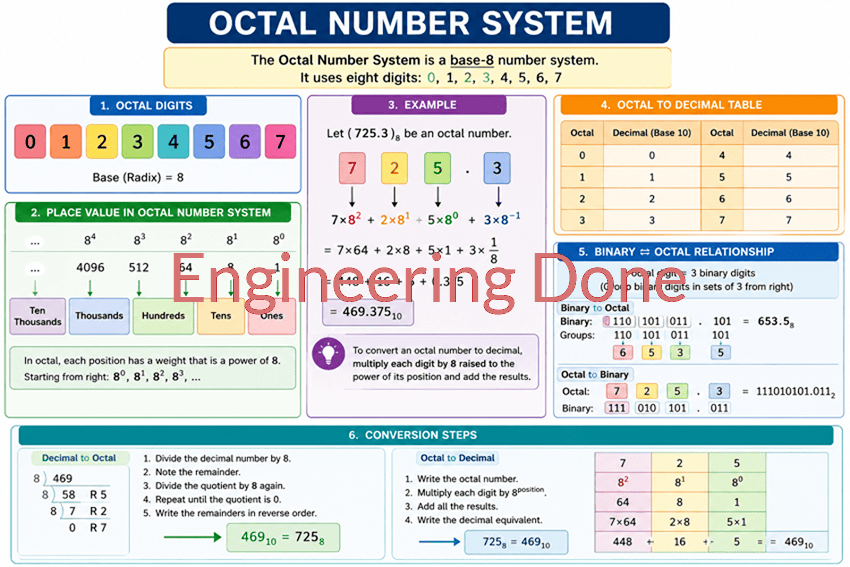
The octal number system is a base-8 numeral system that uses eight digits: 0, 1, 2, 3, 4, 5, 6, and 7. Each octal digit represents exactly three binary bits, making it a convenient shorthand for binary numbers. While largely replaced by hexadecimal in modern computing, octal is still used in Unix/Linux file permissions and some legacy systems.
The Base-8 System: Digits and Positional Weights
The octal system is simpler than both decimal and hexadecimal because it uses fewer digits. In base-8, we only have:
0, 1, 2, 3, 4, 5, 6, 7
Notice that the digits 8 and 9 do not exist in octal. When we count past 7, we carry over to the next position, just like we carry past 9 in decimal or past 1 in binary.
Positional Notation in Octal
Like all positional number systems, the value of an octal digit depends on its position. Moving from right to left, each position represents an increasing power of 8:
- $8^0 = 1$ (The “ones” place)
- $8^1 = 8$ (The “eights” place)
- $8^2 = 64$ (The “sixty-fours” place)
- $8^3 = 512$ (The “five-hundred-twelves” place)
- $8^4 = 4096$ (The “four-thousand-and-ninety-sixes” place)
For example, the octal number 347 means $(3 \times 8^2) + (4 \times 8^1) + (7 \times 8^0) = (3 \times 64) + (4 \times 8) + (7 \times 1) = 192 + 32 + 7 = 231$ in decimal.
Octal to Binary Relationship
The most important feature of octal is its perfect mapping to binary. Since $8 = 2^3$, exactly three binary bits (one octet) map to exactly one octal digit:
| Octal Digit | Binary Equivalent | Decimal Value |
|---|---|---|
| 0 | 000 | 0 |
| 1 | 001 | 1 |
| 2 | 010 | 2 |
| 3 | 011 | 3 |
| 4 | 100 | 4 |
| 5 | 101 | 5 |
| 6 | 110 | 6 |
| 7 | 111 | 7 |
This 3-bit grouping made octal extremely convenient for early computers that processed data in multiples of 3 bits.
Converting Octal to Decimal
Converting octal to decimal uses the Positional Weight Method, identical to the method used for binary and hexadecimal, but with base 8.
Step-by-Step Guide
- Write down the octal number.
- Assign the powers of 8 to each position, starting from $8^0$ on the far right.
- Multiply each octal digit by its positional weight.
- Add the results together to get the decimal value.
Example: Convert 347 to Decimal
Let’s convert the octal number 347 to decimal.
Step 1 & 2: Assign Positional Weights
| Octal Digit | 3 | 4 | 7 |
|---|---|---|---|
| Weight | $8^2$ | $8^1$ | $8^0$ |
| Decimal Weight | 64 | 8 | 1 |
Step 3 & 4: Multiply and Add
- $3 \times 64 = 192$
- $4 \times 8 = 32$
- $7 \times 1 = 7$
Total: $192 + 32 + 7 = \mathbf{231}$
Result: $347_8 = 231_{10}$
Example: Convert 1250 to Decimal
Let’s try a larger number: 1250 (octal).
| Octal Digit | 1 | 2 | 5 | 0 |
|---|---|---|---|---|
| Weight | $8^3$ | $8^2$ | $8^1$ | $8^0$ |
| Decimal Weight | 512 | 64 | 8 | 1 |
Calculation:
- $1 \times 512 = 512$
- $2 \times 64 = 128$
- $5 \times 8 = 40$
- $0 \times 1 = 0$
Total: $512 + 128 + 40 + 0 = \mathbf{680}$
Result: $1250_8 = 680_{10}$
Converting Decimal to Octal
To convert a decimal number to octal, we use the Repeated Division by 8 method, similar to the decimal-to-hex conversion.
Step-by-Step Guide
- Divide the decimal number by 8.
- Record the remainder (this will be your rightmost octal digit).
- Take the quotient and divide it by 8 again.
- Record the new remainder.
- Repeat until the quotient is 0.
- Read the remainders from bottom to top (last to first).
Example: Convert 231 to Octal
Let’s convert 231 (decimal) back to octal.
- $231 \div 8 = 28$ with a remainder of 7
- $28 \div 8 = 3$ with a remainder of 4
- $3 \div 8 = 0$ with a remainder of 3
Reading the remainders from bottom to top: 3, 4, 7.
Result: $231_{10} = 347_8$
Converting Between Octal and Binary
The relationship between octal and binary is the most straightforward of all number system conversions because of the perfect 3-bit mapping.
Octal to Binary
To convert octal to binary, simply replace each octal digit with its corresponding 3-bit binary equivalent.
Example: Convert 527 to Binary
- Break into digits: 5, 2, 7
- Convert each to 3-bit binary:
- 5 = 101
- 2 = 010
- 7 = 111
- Combine them: 101010111
Result: $527_8 = 101010111_2$
Binary to Octal
To convert binary to octal, group the binary digits into sets of three, starting from the right (LSB). If the leftmost group has fewer than three bits, pad it with leading zeros. Then, translate each 3-bit group into its corresponding octal digit.
Example: Convert 110101110 to Octal
- Group into sets of three:
110|101|110 - Convert each group:
110= 4 + 2 + 0 = 6101= 4 + 0 + 1 = 5110= 4 + 2 + 0 = 6
- Combine them: 656
Result: $110101110_2 = 656_8$
How do you convert binary to octal?
To convert binary to octal, group the binary digits into sets of three (starting from the right). Pad the leftmost group with leading zeros if necessary. Then, replace each 3-bit group with its corresponding single octal digit (0-7).
Why Was Octal Used in Early Computing?
Octal was the dominant shorthand for binary in the early days of computing (1950s-1970s) for several practical reasons:
1. Word Length Compatibility
Early computers often used word lengths that were multiples of 3 bits:
- 12-bit systems (e.g., PDP-8): Could be represented by exactly 4 octal digits
- 24-bit systems: Could be represented by exactly 8 octal digits
- 36-bit systems (e.g., PDP-10, IBM 7090): Could be represented by exactly 12 octal digits
This made octal a natural fit for displaying memory addresses, instructions, and data.
2. Simpler Than Hexadecimal
For early programmers who were still adapting to non-decimal systems, octal was easier to learn than hexadecimal. It only used familiar digits (0-7) without the confusing letters (A-F) that hex requires.
3. Hardware Design
Many early computer architectures were designed around 3-bit groups. Instruction sets, register sizes, and memory addressing schemes often aligned perfectly with octal boundaries.
Modern Applications: Unix and Linux File Permissions
While octal has largely been replaced by hexadecimal in most computing applications, it remains critically important in one specific area: Unix and Linux file permissions.
Understanding File Permissions
In Unix-based systems (including Linux and macOS), every file and directory has permissions that control who can read, write, or execute it. These permissions are divided into three categories:
- Owner (the file’s owner)
- Group (users in the file’s group)
- Others (everyone else)
Each category has three permission bits:
- Read (r) = 4
- Write (w) = 2
- Execute (x) = 1
The Octal Representation
These three bits (read, write, execute) perfectly form a 3-bit binary number, which maps directly to a single octal digit (0-7). This is why the chmod command in Unix uses octal notation.
Common Permission Examples:
- 755 (
rwxr-xr-x): Owner has full permissions (7), Group and Others have read+execute (5) - 644 (
rw-r--r--): Owner has read+write (6), Group and Others have read-only (4) - 777 (
rwxrwxrwx): Everyone has full permissions (dangerous!) - 600 (
rw-------): Only the owner can read and write
Example Calculation:
If you want to set permissions to rwxr-x---:
- Owner: r + w + x = 4 + 2 + 1 = 7
- Group: r + x = 4 + 0 + 1 = 5
- Others: — = 0 + 0 + 0 = 0
Octal code: 750
This is why every Unix/Linux administrator must understand octal numbers!
The octal number system, while less common in modern computing than hexadecimal, remains an important part of computer science history and continues to serve critical functions in Unix-based operating systems. Its perfect 3-bit-to-1-digit mapping made it the ideal shorthand for early computers, and its legacy lives on in file permissions that millions of users interact with daily.
Key takeaways from this guide include:
- Base-8 System: Octal uses only eight digits (0-7), and each position represents a power of 8.
- Binary Relationship: One octal digit perfectly equals three binary bits, making conversion a simple grouping exercise.
- Conversions: Octal to decimal uses positional weights (1, 8, 64, 512…); decimal to octal uses repeated division by 8.
- Historical Importance: Octal was the dominant binary shorthand for 12-bit, 24-bit, and 36-bit computer architectures.
- Modern Use: Unix/Linux file permissions (chmod) still rely on octal notation to represent read, write, and execute permissions.
Understanding octal provides insight into the evolution of computing and equips you with the knowledge to manage Unix-based systems effectively. While hexadecimal has become the modern standard for binary representation, octal’s influence persists in the foundations of modern operating systems.