Binary Numbers
Binary Numbers: The Complete Guide to the Base-2 Digital System
Introduction to Binary Numbers
When you look at a computer screen, watch a video on your smartphone, or send a text message, it is easy to forget that the device processing all this information does not understand letters, images, or words. At the most fundamental hardware level, computers only understand two states: On and Off.
This simple reality is the foundation of binary numbers, the base-2 numeral system that serves as the universal language of computing and digital electronics. While humans naturally use the base-10 (decimal) system because we have ten fingers, computers use the base-2 system because their microscopic processors are built from billions of tiny electronic switches (transistors) that can only exist in two states.
Understanding binary numbers is the crucial first step in learning digital electronics, computer science, and programming. This comprehensive guide will explore the theory, structure, and importance of the binary number system, providing you with a rock-solid foundation for all future digital logic studies.
What are Binary Numbers?
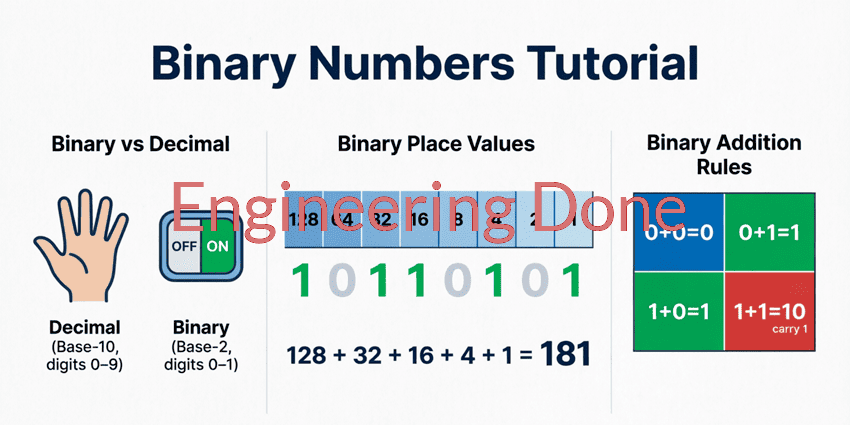
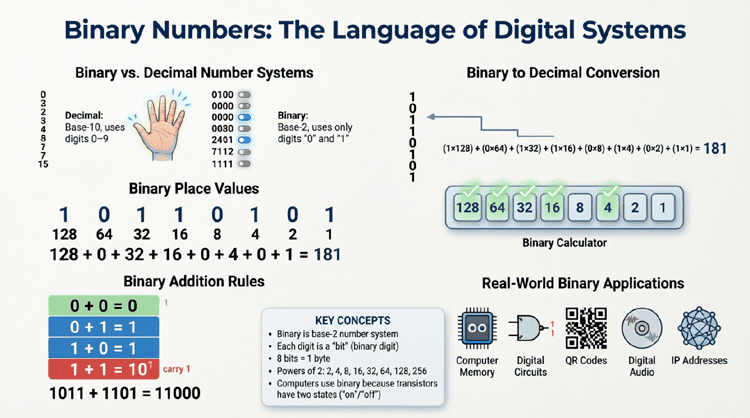
Binary numbers are a base-2 numeral system that uses only two digits: 0 and 1. Each digit in a binary number is called a “bit” (binary digit). The system is positional, meaning the value of each bit is determined by its position, which represents a power of 2 (e.g., 1, 2, 4, 8, 16). It is the fundamental language used by all modern computers and digital devices.
What is a Number System?
Before diving into binary, it is helpful to understand what a “number system” actually is. A number system is a mathematical way of representing numbers using a specific set of symbols or digits. The most important characteristic of a number system is its base (or radix), which determines how many unique digits the system uses and how positional value is calculated.
In any positional number system, the value of a digit is determined by:
- The digit itself.
- Its position within the number.
- The base of the number system.
For example, in our everyday decimal system (Base-10), the number “253” means:
$(2 \times 10^2) + (5 \times 10^1) + (3 \times 10^0) = 200 + 50 + 3 = 253$.
The binary system works on the exact same mathematical principle, but instead of using Base-10, it uses Base-2.
The Base-2 System: Binary vs. Decimal
The decimal system (Base-10) uses ten unique digits: 0, 1, 2, 3, 4, 5, 6, 7, 8, and 9. When we count past 9, we carry over to the next positional column (the tens place).
The binary system (Base-2) uses only two unique digits: 0 and 1.
- 0 represents the “Off” state (no voltage, false, low).
- 1 represents the “On” state (voltage present, true, high).
When counting in binary, as soon as we exceed the highest available digit (1), we must carry over to the next positional column. Because the base is 2, each position to the left represents a power of 2, rather than a power of 10.
Positional Values in Binary
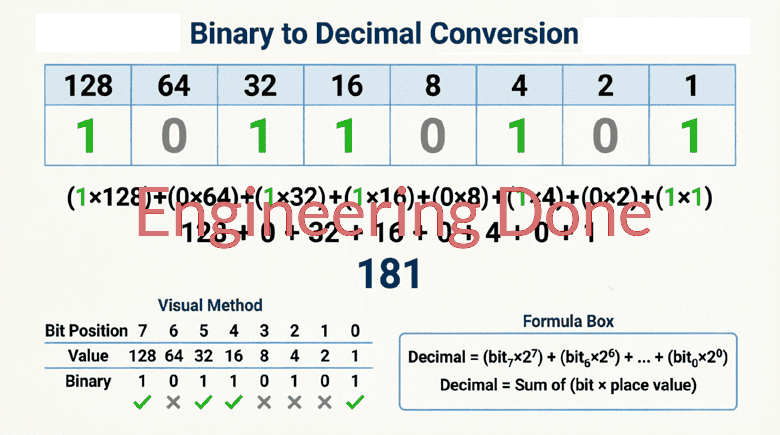
In a binary number, the rightmost bit is the Least Significant Bit (LSB), and the leftmost bit is the Most Significant Bit (MSB). The positional values from right to left are:
| Position (from right) | 7th | 6th | 5th | 4th | 3rd | 2nd | 1st | 0th (LSB) |
|---|---|---|---|---|---|---|---|---|
| Power of 2 | $2^7$ | $2^6$ | $2^5$ | $2^4$ | $2^3$ | $2^2$ | $2^1$ | $2^0$ |
| Decimal Value | 128 | 64 | 32 | 16 | 8 | 4 | 2 | 1 |
To find the decimal value of a binary number, you simply add up the decimal values of the positions where a “1” is present.
For example, the binary number 1011 is calculated as:
$(1 \times 2^3) + (0 \times 2^2) + (1 \times 2^1) + (1 \times 2^0)$
$= 8 + 0 + 2 + 1 = \mathbf{11}$ in decimal.
How Counting Works in Binary
Counting in binary follows the exact same logic as counting in decimal, but it “rolls over” much faster because it only has two digits. Let’s look at how we count from zero to ten in binary:
- 0 = 0
- 1 = 1
- 10 = 2 (We run out of digits, so we carry the 1 to the next column and reset to 0)
- 11 = 3
- 100 = 4 (Carry over again, reset the lower columns to 0)
- 101 = 5
- 110 = 6
- 111 = 7
- 1000 = 8
- 1001 = 9
- 1010 = 10
Notice the pattern: the rightmost bit (LSB) alternates between 0 and 1 with every single count. The next bit alternates every two counts, the next every four counts, and so on. This predictable pattern is what makes binary so easy to generate and read using digital electronic circuits.
Bits, Nibbles, Bytes, and Words
In digital electronics and computer science, binary digits are grouped into specific sizes to represent data. Understanding these groupings is essential for working with digital systems.
The Bit (Binary Digit)
A bit is the smallest unit of data in a computer. It can hold a single value of either 0 or 1. The term “bit” was coined by mathematician John Tukey in 1946 as a shortening of “binary digit.”
The Nibble
A nibble (sometimes spelled nybble) is a group of 4 bits.
- A nibble can represent $2^4 = 16$ unique values (from 0000 to 1111 in binary, or 0 to 15 in decimal).
- Nibbles are highly important because a single nibble perfectly corresponds to one Hexadecimal digit (Base-16), making hex a convenient shorthand for binary.
The Byte
A byte is a group of 8 bits (or 2 nibbles).
- A byte can represent $2^8 = 256$ unique values (from 00000000 to 11111111 in binary, or 0 to 255 in decimal).
- The byte is the fundamental addressable unit of memory in most computer architectures. It is large enough to represent a single standard ASCII character (like the letter ‘A’ or the number ‘5’).
The Word
A word is the natural data size that a specific computer processor can handle at one time.
- In older 8-bit systems, a word was 8 bits (1 byte).
- In modern 64-bit processors, a word is 64 bits (8 bytes).
Why Do Computers Use Binary?
It is entirely possible to build computers that use base-10 (decimal) or base-3 (ternary) systems. In fact, early experimental computers did use decimal systems. However, binary won out for several critical engineering and physical reasons:
1. Simplicity of Hardware Design
Computer processors are built using transistors, which act as microscopic electronic switches. A transistor is incredibly easy to design to operate in two distinct states: fully conducting (On/1) or fully non-conducting (Off/0). Designing a transistor to reliably distinguish between 10 different voltage levels (for a decimal system) would be exponentially more complex, expensive, and prone to failure.
2. Noise Immunity and Reliability
In an electronic circuit, electrical noise, temperature fluctuations, and voltage drops are unavoidable.
- In a binary system, the voltage threshold is simple: anything below 0.8V might be a “0”, and anything above 2.0V might be a “1”. Even if electrical noise shifts the voltage by 0.5V, the system can still easily and reliably tell the difference between a 0 and a 1.
- In a 10-state decimal system, the voltage margins between each state would be so tiny that minor electrical noise would constantly cause calculation errors. Binary provides massive noise margins, ensuring high reliability.
3. Boolean Logic Compatibility
Binary maps perfectly to Boolean algebra, the mathematical logic system developed by George Boole in the 1800s. Boolean logic uses only two values: True (1) and False (0). This allows engineers to use simple logic gates (AND, OR, NOT, XOR) to perform complex mathematical and logical operations.
Visualizing Binary in Digital Circuits
To truly understand how binary numbers exist in the physical world, we must look at how they are stored and processed in digital circuits.
Flip-Flops and Memory
Binary numbers are stored in digital memory using circuits called flip-flops. A single flip-flop is a basic electronic circuit that can hold one bit of information (either a 0 or a 1) as long as power is supplied. To store an 8-bit binary number (a byte), a computer chip simply chains together 8 individual flip-flops.
Logic Gates
Binary numbers are processed using logic gates. These are physical circuits that take one or more binary inputs and produce a single binary output based on a specific rule. For example, an AND gate will only output a “1” if all of its inputs are “1”. By combining millions of these gates, computers can add, subtract, multiply, and divide binary numbers at billions of operations per second.
Binary numbers are the fundamental bedrock of the digital age. By reducing all information to a simple sequence of 0s and 1s, engineers have been able to create incredibly complex, reliable, and fast electronic systems.
Key takeaways from this guide include:
- Base-2 System: Binary uses only two digits (0 and 1), and each position represents a power of 2.
- Positional Notation: The value of a binary number is found by summing the powers of 2 where a “1” is present.
- Data Groupings: Bits are grouped into nibbles (4 bits), bytes (8 bits), and words to represent larger data.
- Hardware Efficiency: Binary is used because it perfectly matches the two-state (On/Off) nature of transistors, providing high noise immunity and simple logic gate design.
While reading a long string of 1s and 0s might seem daunting at first, it is simply a different way of counting. Once you understand the positional values of Base-2, the “secret language” of computers becomes entirely logical and accessible.