Binary Fractions
Binary Fractions: The Complete Guide to Fractional Binary Numbers
Introduction to Binary Fractions
The computers represent whole numbers using binary, hexadecimal, and BCD systems. However, the real world is rarely composed of whole numbers alone. We deal with fractions, decimals, and real numbers constantly—from the price of gas ($3.459 per gallon) to the temperature outside (72.5°F), to the precise coordinates of a GPS location.
How does a computer, which fundamentally only understands 1s and 0s, represent these fractional values? The answer lies in binary fractions.
Just as decimal fractions use a decimal point to separate whole numbers from fractional parts (e.g., 10.25), binary fractions use a binary point (also called a radix point) to separate the integer part from the fractional part. However, converting decimal fractions to binary is more complex than converting whole numbers, and some decimal fractions cannot be represented exactly in binary, leading to the rounding errors that sometimes plague financial and scientific computing.
This comprehensive guide will explore how binary fractions work, how to convert between decimal and binary fractions, and the two primary methods computers use to store fractional values: fixed-point and floating-point representation.
How do you convert a decimal fraction to binary?
To convert a decimal fraction to binary, use the repeated multiplication by 2 method. Multiply the fractional part by 2, record the integer part (0 or 1) as the next binary digit, then repeat with the new fractional part until it becomes zero or you reach the desired precision. For example, 0.625 × 2 = 1.25 (record 1), 0.25 × 2 = 0.5 (record 0), 0.5 × 2 = 1.0 (record 1), giving 0.101 in binary.
Understanding the Binary Point
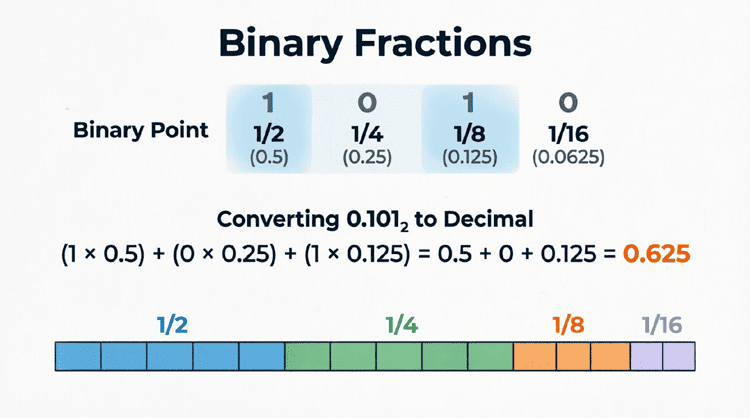
The binary point functions exactly like the decimal point, but with base-2 positional weights instead of base-10.
Positional Weights in Binary Fractions
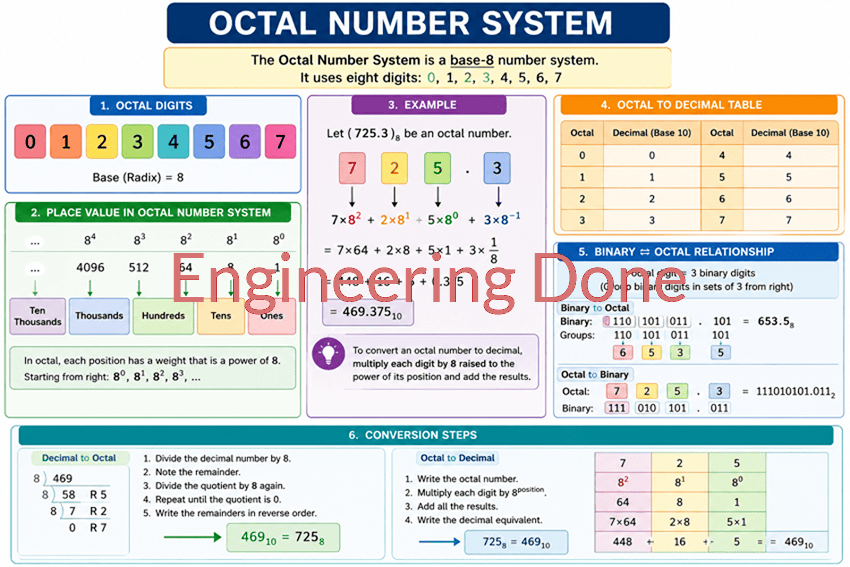
In a decimal fraction like 10.25, the positions represent:
- Left of decimal: $10^1, 10^0$ (tens, ones)
- Right of decimal: $10^{-1}, 10^{-2}$ (tenths, hundredths)
In a binary fraction, the positions represent:
- Left of binary point: $2^1, 2^0$ (twos, ones)
- Right of binary point: $2^{-1}, 2^{-2}, 2^{-3}, 2^{-4}$…
These negative powers of 2 correspond to:
- $2^{-1} = 1/2 = 0.5$
- $2^{-2} = 1/4 = 0.25$
- $2^{-3} = 1/8 = 0.125$
- $2^{-4} = 1/16 = 0.0625$
- $2^{-5} = 1/32 = 0.03125$
Example: Reading a Binary Fraction
Let’s interpret the binary fraction 101.101:
Integer part (left of point): 101
- $1 \times 2^2 + 0 \times 2^1 + 1 \times 2^0 = 4 + 0 + 1 = 5$
Fractional part (right of point): .101
- $1 \times 2^{-1} + 0 \times 2^{-2} + 1 \times 2^{-3}$
- $= 1 \times 0.5 + 0 \times 0.25 + 1 \times 0.125$
- $= 0.5 + 0 + 0.125 = 0.625$
Total: $5 + 0.625 = \mathbf{5.625}$ in decimal.
Converting Decimal Fractions to Binary
Converting the integer part of a number to binary is straightforward (repeated division by 2). Converting the fractional part requires a different technique: repeated multiplication by 2.
Step-by-Step Conversion Method
- Separate the decimal number into its integer and fractional parts.
- Convert the integer part using repeated division by 2 (standard method).
- For the fractional part:
- Multiply the fraction by 2.
- If the result is ≥ 1, the binary digit is 1. If < 1, the binary digit is 0.
- Record the digit and keep only the fractional part of the result.
- Repeat until the fractional part becomes 0 or you reach the desired precision.
- Combine the integer and fractional binary parts with a binary point.
Example 1: Converting 0.625 to Binary
Let’s convert the decimal fraction 0.625 to binary.
Step 1: Integer part is 0, so we focus on the fraction 0.625.
Step 2: Repeated multiplication:
- $0.625 \times 2 = 1.25$ → Integer part is 1, keep 0.25
- $0.25 \times 2 = 0.5$ → Integer part is 0, keep 0.5
- $0.5 \times 2 = 1.0$ → Integer part is 1, keep 0.0
Step 3: The fractional part is now 0, so we stop.
Result: Reading the integer parts from top to bottom: 0.101
Verification: $0.101_2 = 0.5 + 0.125 = 0.625_{10}$ ✓
Example 2: Converting 0.1 to Binary (The Repeating Fraction Problem)
Now let’s try converting 0.1 (one-tenth) to binary. This reveals a critical limitation of binary fractions.
Repeated multiplication:
- $0.1 \times 2 = 0.2$ → 0, keep 0.2
- $0.2 \times 2 = 0.4$ → 0, keep 0.4
- $0.4 \times 2 = 0.8$ → 0, keep 0.8
- $0.8 \times 2 = 1.6$ → 1, keep 0.6
- $0.6 \times 2 = 1.2$ → 1, keep 0.2
- $0.2 \times 2 = 0.4$ → 0, keep 0.4
- $0.4 \times 2 = 0.8$ → 0, keep 0.8
- $0.8 \times 2 = 1.6$ → 1, keep 0.6
Notice the pattern? We’re back to 0.2, which means this will repeat forever!
Result: $0.1_{10} = 0.0001100110011…_2$ (repeating infinitely)
This is the binary equivalent of $1/3 = 0.333…$ in decimal. Because computers have finite memory, they must truncate or round this infinite sequence, which introduces rounding errors. This is why 0.1 + 0.2 in many programming languages doesn’t exactly equal 0.3!
Why can’t some decimal fractions be represented exactly in binary?
Just as 1/3 cannot be represented exactly in decimal (it becomes 0.333… repeating), many decimal fractions like 0.1 cannot be represented exactly in binary. They become infinite repeating binary fractions that must be truncated, leading to rounding errors in floating-point arithmetic.
Converting Binary Fractions to Decimal
Converting binary fractions back to decimal is straightforward using the positional weight method.
Step-by-Step Method
- Write down the binary fraction.
- Assign positional weights to each bit position (powers of 2, including negative powers for the fractional part).
- Multiply each bit by its positional weight.
- Sum all the results.
Example: Convert 11.011 to Decimal
Let’s convert the binary number 11.011 to decimal.
Positional weights:
- Left of point: $2^1, 2^0$
- Right of point: $2^{-1}, 2^{-2}, 2^{-3}$
Calculation:
- $1 \times 2^1 = 1 \times 2 = 2$
- $1 \times 2^0 = 1 \times 1 = 1$
- $0 \times 2^{-1} = 0 \times 0.5 = 0$
- $1 \times 2^{-2} = 1 \times 0.25 = 0.25$
- $1 \times 2^{-3} = 1 \times 0.125 = 0.125$
Sum: $2 + 1 + 0 + 0.25 + 0.125 = \mathbf{3.375}$
Result: $11.011_2 = 3.375_{10}$
Fixed-Point vs. Floating-Point Representation
Computers use two primary methods to store fractional binary numbers: fixed-point and floating-point representation.
Fixed-Point Representation
In fixed-point representation, the binary point is assumed to be at a fixed position within the binary word. The programmer or system designer decides in advance how many bits are allocated to the integer part and how many to the fractional part.
Example: 8-bit Fixed-Point (4 integer bits, 4 fractional bits)
- Format:
IIII.FFFF(where I = integer bit, F = fractional bit) - Range: 0 to 15.9375 (with 1/16 precision)
- Example:
0101.1010= $5 + 0.5 + 0.125 = 5.625$
Advantages:
- Fast arithmetic (uses standard integer operations)
- Predictable precision
- No rounding errors for fractions that fit the format
Disadvantages:
- Limited range (can’t represent very large or very small numbers)
- Wasted bits if the number doesn’t use the full range
- Inflexible (can’t adjust precision dynamically)
Applications: Digital signal processing, embedded systems, financial calculations where precision is known in advance.
Floating-Point Representation
Floating-point representation is the modern standard for representing real numbers in computers (defined by the IEEE 754 standard). It works like scientific notation, but in binary.
A floating-point number consists of three parts:
- Sign bit: 0 for positive, 1 for negative
- Exponent: Represents the power of 2 (biased to allow negative exponents)
- Mantissa (Significand): The significant digits of the number
Example: IEEE 754 Single Precision (32-bit)
- 1 bit: Sign
- 8 bits: Exponent (biased by 127)
- 23 bits: Mantissa
Advantages:
- Huge range (can represent numbers from ~10^-38 to ~10^38)
- Dynamic precision (adjusts automatically)
- Standardized across all modern computers
Disadvantages:
- Slower than fixed-point arithmetic
- Rounding errors are common
- Complex hardware requirements
Applications: Scientific computing, graphics, general-purpose programming, engineering simulations.
Practical Applications of Binary Fractions
1. Digital Audio
CD-quality audio uses 16-bit fixed-point representation with a sampling rate of 44,100 Hz. Each sample is a binary fraction representing the amplitude of the sound wave at that instant.
2. GPS and Navigation
GPS coordinates require extreme precision. Floating-point binary fractions allow GPS systems to represent latitude and longitude with accuracy down to centimeters.
3. Financial Computing
While floating-point is common, many financial systems use fixed-point or BCD (Binary Coded Decimal) to avoid the rounding errors inherent in binary floating-point representation. A penny lost to rounding error across millions of transactions adds up quickly!
4. Computer Graphics
3D graphics rely heavily on floating-point arithmetic to calculate positions, lighting, textures, and transformations. Modern GPUs (Graphics Processing Units) are optimized for floating-point operations.
Binary fractions are the bridge between the discrete world of digital logic and the continuous world of real numbers. By using a binary point and negative powers of 2, computers can represent fractional values with remarkable precision. However, the fundamental mismatch between base-10 (human) and base-2 (machine) number systems means that some decimal fractions cannot be represented exactly in binary, leading to the rounding errors that every programmer must eventually confront.
Key takeaways from this guide include:
- Binary Point: Functions like a decimal point but uses powers of 2 ($2^{-1}, 2^{-2}, 2^{-3}$…) for fractional positions.
- Decimal to Binary Conversion: Use repeated multiplication by 2 for the fractional part.
- Repeating Fractions: Many decimal fractions (like 0.1) become infinite repeating binary fractions, causing rounding errors.
- Fixed-Point: Allocates a fixed number of bits to integer and fractional parts; fast but inflexible.
- Floating-Point: Uses scientific notation format (sign, exponent, mantissa); flexible range but subject to rounding errors.
- Real-World Impact: Binary fractions are essential for audio, GPS, finance, graphics, and virtually all scientific computing.
Understanding binary fractions completes your journey through digital number systems. From the simple on/off states of binary digits to the complex floating-point representations that power modern supercomputers, you now possess the foundational knowledge to understand how computers represent and manipulate all forms of numerical data.