Hexadecimal Numbers
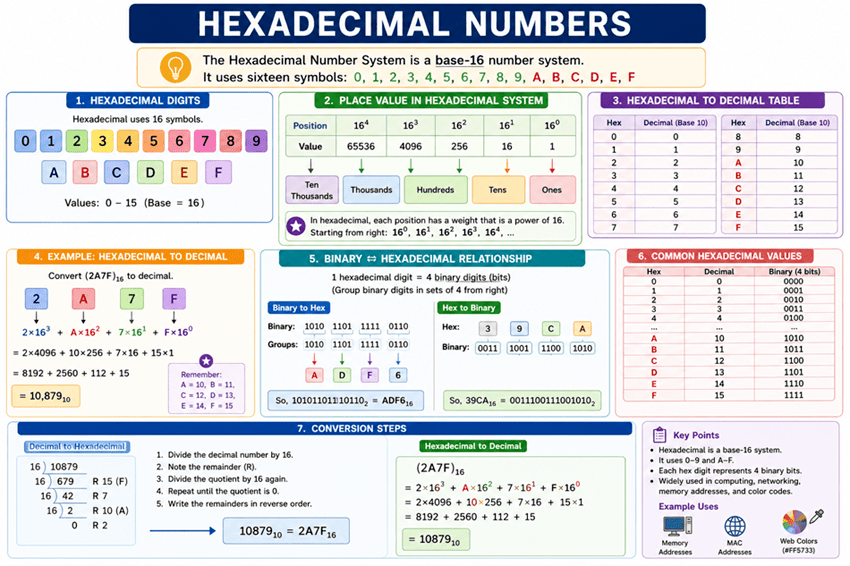
Hexadecimal Numbers: The Complete Guide to Base-16 and Binary Shorthand
Introduction to Hexadecimal
If you have ever tried to read a long string of binary code, such as 11010110111100101011010011100001, you know it is incredibly difficult for the human brain to process. It is easy to lose your place, miss a zero, or miscount the digits. Yet, computers rely on these long binary strings to store memory addresses, process data, and render graphics.
To solve this human readability problem, computer scientists use Hexadecimal (often shortened to Hex). Hexadecimal is a base-16 number system that acts as a highly efficient shorthand for binary. Because 16 is a power of 2 ($2^4 = 16$), a single hexadecimal digit can perfectly represent exactly four binary digits (a nibble). This allows us to compress long, unreadable binary strings into short, manageable hex codes.
From the color codes used in web design (like #FF5733) to the MAC addresses on your network router, hexadecimal is everywhere in the digital world. This comprehensive guide will explore the base-16 system, how to convert between hex, binary, and decimal, and why this number system is an indispensable tool in computing.
What is a Hexadecimal Number?
A hexadecimal number is a base-16 numeral system that uses 16 unique symbols to represent values: the digits 0-9 and the letters A-F (where A=10, B=11, C=12, D=13, E=14, and F=15). It is primarily used in computing as a human-friendly shorthand for binary code, as one hex digit perfectly represents a 4-bit binary nibble.
The Base-16 System: Digits and Positional Weights
Just as the decimal system is base-10 and binary is base-2, hexadecimal is base-16. This means it requires 16 unique symbols to represent all possible single-digit values.
Since we only have 10 standard numerical digits (0 through 9), the system borrows the first six letters of the English alphabet to represent the values 10 through 15:
| Hex Digit | Decimal Value | Binary Equivalent |
|---|---|---|
| 0 – 9 | 0 – 9 | 0000 – 1001 |
| A | 10 | 1010 |
| B | 11 | 1011 |
| C | 12 | 1100 |
| D | 13 | 1101 |
| E | 14 | 1110 |
| F | 15 | 1111 |
Positional Notation in Hexadecimal
Like all positional number systems, the value of a hex digit depends on its position. Moving from right to left, each position represents an increasing power of 16:
- $16^0 = 1$ (The “ones” place)
- $16^1 = 16$ (The “sixteens” place)
- $16^2 = 256$ (The “two-hundred-fifty-sixes” place)
- $16^3 = 4096$ (The “four-thousand-and-ninety-sixes” place)
For example, the hex number 2C means $(2 \times 16^1) + (12 \times 16^0) = 32 + 12 = 44$ in decimal.
Converting Hexadecimal to Decimal
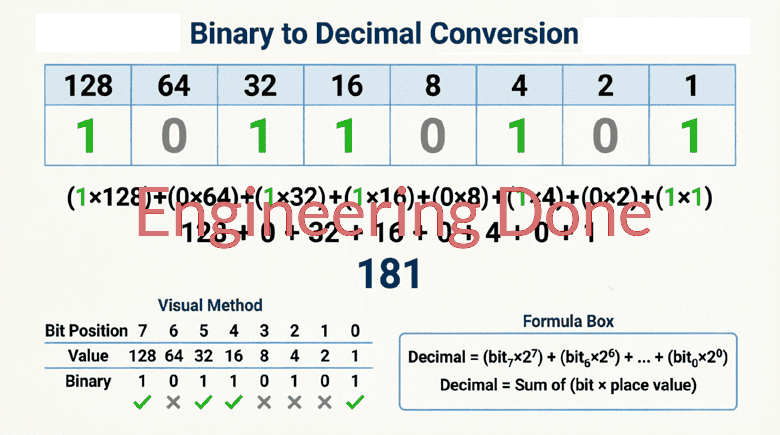
Converting hex to decimal uses the exact same Positional Weight Method we used for binary, but the base is 16 instead of 2.
Step-by-Step Guide
- Write down the hexadecimal number.
- Assign the powers of 16 to each position, starting from $16^0$ on the far right.
- Convert any letter digits (A-F) to their decimal equivalents (10-15).
- Multiply each digit by its positional weight.
- Add the results together.
Example: Convert 2A3F to Decimal
Let’s convert the 4-digit hex number 2A3F to decimal.
Step 1 & 2: Assign Positional Weights
| Hex Digit | 2 | A | 3 | F |
|---|---|---|---|---|
| Weight | $16^3$ | $16^2$ | $16^1$ | $16^0$ |
| Decimal Weight | 4096 | 256 | 16 | 1 |
Step 3: Convert Letters to Decimals
- A = 10
- F = 15
Step 4 & 5: Multiply and Add
- $2 \times 4096 = 8192$
- $10 \times 256 = 2560$
- $3 \times 16 = 48$
- $15 \times 1 = 15$
Total: $8192 + 2560 + 48 + 15 = \mathbf{10,815}$
Result: $2A3F_{16} = 10,815_{10}$
Converting Decimal to Hexadecimal
To convert a standard decimal number into hexadecimal, we use the Repeated Division by 16 method. This is the exact inverse of the positional weight method.
Step-by-Step Guide
- Divide the decimal number by 16.
- Record the remainder (this will be your rightmost hex digit). If the remainder is 10-15, convert it to A-F.
- Take the quotient (the whole number result of the division) and divide it by 16 again.
- Record the new remainder.
- Repeat this process until the quotient is 0.
- Read the remainders from bottom to top (or last to first) to get the final hex number.
Example: Convert 10,815 to Hex
Let’s reverse our previous example and convert 10,815 back to hex.
- $10815 \div 16 = 675$ with a remainder of 15 (which is F)
- $675 \div 16 = 42$ with a remainder of 3 (which is 3)
- $42 \div 16 = 2$ with a remainder of 10 (which is A)
- $2 \div 16 = 0$ with a remainder of 2 (which is 2)
Reading the remainders from bottom to top: 2, A, 3, F.
Result: $10,815_{10} = 2A3F_{16}$
The Magic of Binary to Hexadecimal Conversion
The primary reason hexadecimal was adopted by the computing industry is how effortlessly it converts to and from binary. Because $16 = 2^4$, exactly four binary bits (one nibble) map to exactly one hexadecimal digit.
Binary to Hexadecimal
To convert binary to hex, simply group the binary digits into sets of four, starting from the right (the LSB). If the leftmost group has fewer than four bits, pad it with leading zeros. Then, translate each 4-bit group into its corresponding hex digit.
Example: Convert 101101011111 to Hex
- Group into nibbles:
1011|0101|1111 - Convert each group:
1011= 8 + 2 + 1 = 11 = B0101= 4 + 1 = 5 = 51111= 8 + 4 + 2 + 1 = 15 = F
- Combine them: B5F
Result: $101101011111_2 = B5F_{16}$
Hexadecimal to Binary
To convert hex to binary, simply replace every single hex digit with its corresponding 4-bit binary equivalent.
Example: Convert C9 to Binary
- Break into digits: C and 9
- Convert to 4-bit binary:
- C (12) = 1100
- 9 (9) = 1001
- Combine them: 11001001
Result: $C9_{16} = 11001001_2$
How do you convert binary to hexadecimal?
To convert binary to hexadecimal, group the binary digits into sets of four (nibbles) starting from the right. Pad the leftmost group with leading zeros if necessary. Then, replace each 4-bit group with its corresponding single hexadecimal digit (0-9, A-F).
Why is Hexadecimal Used in Computing?
Hexadecimal is not used by the computer’s CPU for actual math—the CPU still uses binary. Hexadecimal is strictly a human-interface tool. It bridges the gap between the machine’s native language and the human brain.
1. Memory Addresses and Debugging
When a computer crashes or a programmer is debugging code, they look at “memory dumps.” A modern computer might have 16 Gigabytes of RAM. Representing those memory addresses in decimal would result in massive, unwieldy numbers. Representing them in binary would take up entire pages of text. Hexadecimal compresses a 32-bit binary memory address into just 8 readable characters (e.g., 0x7FFE4A2B).
2. Web Design and HTML Color Codes
If you have ever coded a website, you have used hex colors. Colors on a screen are made of Red, Green, and Blue (RGB) light. Each color channel is represented by 8 bits (1 byte), which can range from 0 to 255 in decimal. In hex, 0 to 255 is perfectly represented by 00 to FF.
- Pure Red:
#FF0000 - Pure Green:
#00FF00 - Pure Blue:
#0000FF - White (all maxed out):
#FFFFFF
3. MAC Addresses and IPv6
Every network interface card has a unique Media Access Control (MAC) address, which is 48 bits long. In hex, this is written as 12 characters, usually grouped by colons (e.g., 00:1A:2B:3C:4D:5E). Similarly, the newer IPv6 internet addressing system uses 128-bit addresses, which are written as eight groups of four hex digits.
4. Assembly Language and Machine Code
Low-level programmers who write in Assembly language or read machine code opcodes use hex to represent processor instructions. A complex binary instruction like 1011000001100001 is much easier to read, write, and memorize as B061.
Hexadecimal is the ultimate compromise between the computer’s need for binary logic and the human need for readable, concise data. By utilizing a base-16 system that incorporates the letters A through F, we can compress long, error-prone binary strings into short, manageable codes.
Key takeaways from this guide include:
- Base-16 System: Hex uses 16 symbols (0-9 and A-F) to represent values from 0 to 15.
- Positional Weights: Hex positions represent powers of 16 (1, 16, 256, 4096…).
- Conversions: Hex to decimal uses positional weights; decimal to hex uses repeated division by 16.
- The Nibble Connection: One hex digit perfectly equals four binary bits, making binary-to-hex conversion a simple grouping exercise.
- Real-World Use: Hex is the standard for memory addresses, web colors, MAC addresses, and low-level programming.
Understanding hexadecimal unlocks a deeper comprehension of how computers store, address, and display information. It is an essential literacy for anyone stepping into the realms of computer science, networking, or digital electronics.