Binary Coded Decimal (BCD)
Binary Coded Decimal (BCD): The Complete Guide to Digital Decimal Encoding
Introduction to Binary Coded Decimal
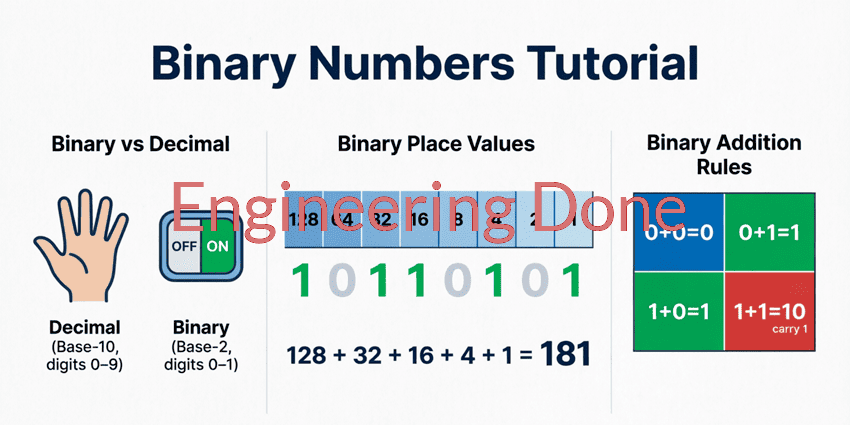
The computers use pure binary (base-2) to represent and calculate numbers. Pure binary is incredibly efficient for the silicon inside a processor. However, it has one major drawback: it does not map cleanly to the base-10 (decimal) number system that humans use every day.
For example, the decimal number 25 is 11001 in pure binary. If a computer needs to display this number on a digital clock or a calculator screen, it must perform complex mathematical conversions to separate the “2” and the “5” from the binary string 11001.
To solve this problem, engineers developed Binary Coded Decimal (BCD). BCD is a hybrid encoding system that bridges the gap between human-readable decimal numbers and machine-readable binary. Instead of converting the entire decimal number into binary, BCD converts each individual decimal digit into a 4-bit binary code.
This comprehensive guide will explore how BCD works, the difference between BCD and pure binary, the various types of BCD, and why it remains a critical technology in digital displays, calculators, and financial computing.
What is Binary Coded Decimal (BCD)?
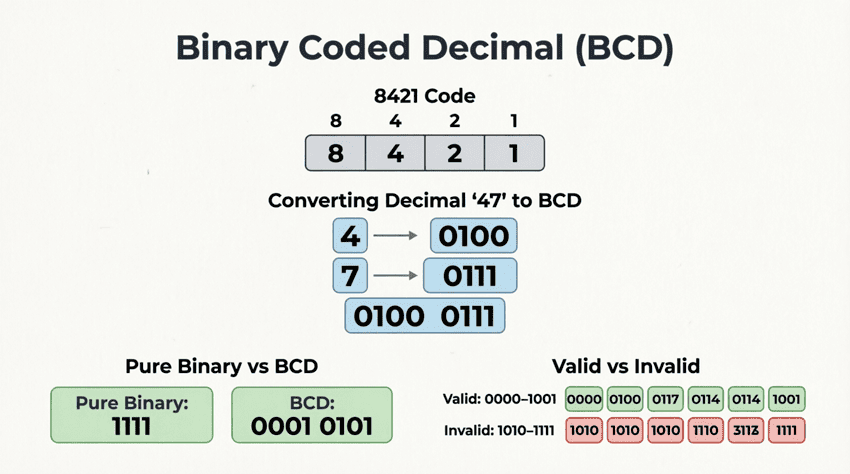
Binary Coded Decimal (BCD) is a digital encoding method where each individual decimal digit (0-9) is represented by its own 4-bit binary equivalent. For example, the decimal number 45 is represented in BCD as0100 0101(0100 for 4, and 0101 for 5), rather than the pure binary equivalent101101.
Understanding the 8421 BCD Code
The most common type of BCD is the 8421 code, named after the binary weights of the four bits ($8, 4, 2, 1$). In this system, every decimal digit from 0 to 9 is represented by a specific 4-bit binary nibble.
Here is the standard 8421 BCD mapping:
| Decimal Digit | 8421 BCD Code |
|---|---|
| 0 | 0000 |
| 1 | 0001 |
| 2 | 0010 |
| 3 | 0011 |
| 4 | 0100 |
| 5 | 0101 |
| 6 | 0110 |
| 7 | 0111 |
| 8 | 1000 |
| 9 | 1001 |
The “Forbidden” States
Notice that the mapping stops at 9 (1001). In a 4-bit binary system, there are 16 possible combinations (0000 to 1111). In pure binary, the combinations from 1010 to 1111 represent the decimal numbers 10 through 15 (or A through F in hex).
However, in standard 8421 BCD, these six combinations (1010, 1011, 1100, 1101, 1110, 1111) are invalid or “forbidden.” If a digital circuit encounters one of these states while processing BCD, it indicates an error or an invalid operation.
Converting Between Decimal and BCD
Because BCD operates on a digit-by-digit basis, converting between decimal and BCD is incredibly straightforward.
Decimal to BCD Conversion
To convert a decimal number to BCD, simply replace each decimal digit with its corresponding 4-bit binary code.
Example: Convert 839 to BCD
- Break the number into individual digits: 8, 3, 9
- Convert each digit to 4-bit BCD:
- 8 =
1000 - 3 =
0011 - 9 =
1001
- Combine them:
1000 0011 1001
Result: $839_{10} = 1000\ 0011\ 1001_{BCD}$
BCD to Decimal Conversion
To convert BCD back to decimal, group the bits into sets of four (starting from the right) and convert each nibble into its decimal equivalent.
Example: Convert 0111 0101 0010 to Decimal
- Group into nibbles:
0111|0101|0010 - Convert each nibble:
0111= 70101= 50010= 2
- Combine the digits: 752
Result: $0111\ 0101\ 0010_{BCD} = 752_{10}$
The Crucial Difference: BCD vs. Pure Binary
The most common mistake beginners make is assuming BCD and pure binary are the same thing. They are fundamentally different. Pure binary calculates the value of the entire number using powers of 2, while BCD calculates the value of each individual digit using powers of 2.
Let’s look at the decimal number 25.
In Pure Binary:
We find the powers of 2 that add up to 25: $16 + 8 + 1 = 25$.
Binary: 11001 (5 bits total)
In BCD:
We convert the digit ‘2’ and the digit ‘5’ separately.
- 2 =
0010 - 5 =
0101
BCD:0010 0101(8 bits total)
Notice that the BCD representation is longer (8 bits vs 5 bits) and the bit patterns are completely different. BCD is less memory-efficient, but it preserves the exact decimal structure of the number.
Types of BCD: Packed vs. Unpacked
When storing BCD in computer memory, engineers use two primary formats: Unpacked BCD and Packed BCD.
1. Unpacked BCD
In unpacked BCD, each decimal digit is stored in a full 8-bit byte. The 4-bit BCD code occupies the lower nibble (the rightmost 4 bits), and the upper nibble (the leftmost 4 bits) is filled with zeros.
Example: Storing the number 45 in Unpacked BCD
- Digit 4:
0000 0100(1 byte) - Digit 5:
0000 0101(1 byte) - Total Memory Used: 2 bytes (16 bits)
Unpacked BCD is very easy for a processor to manipulate because each digit is perfectly aligned with standard 8-bit memory addresses, but it wastes a lot of memory space.
2. Packed BCD
In packed BCD, two decimal digits are squeezed into a single 8-bit byte. One digit occupies the upper nibble, and the other occupies the lower nibble.
Example: Storing the number 45 in Packed BCD
- Digit 4 (upper nibble):
0100 - Digit 5 (lower nibble):
0101 - Combined Byte:
0100 0101 - Total Memory Used: 1 byte (8 bits)
Packed BCD is the industry standard for memory storage because it doubles the storage efficiency compared to unpacked BCD.
What is the difference between Packed and Unpacked BCD?
In Unpacked BCD, each decimal digit takes up a full 8-bit byte (wasting 4 bits per digit). In Packed BCD, two decimal digits are stored in a single 8-bit byte, with one digit in the upper 4 bits and the other in the lower 4 bits, making it twice as memory-efficient.
Advantages and Disadvantages of BCD
Why use BCD if pure binary is more efficient? Like all engineering choices, BCD involves trade-offs.
Advantages
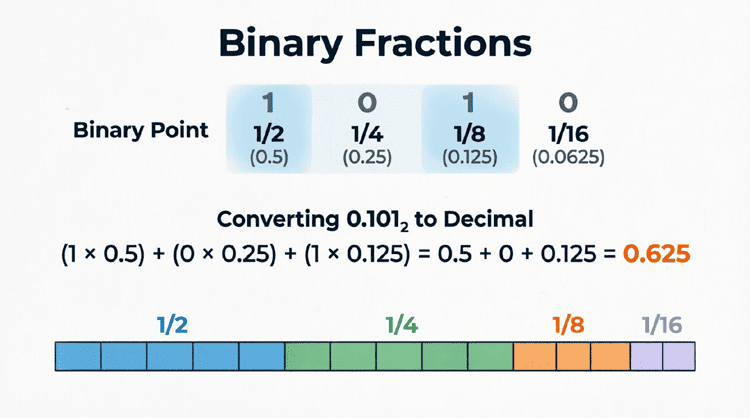
- Exact Decimal Precision: Pure binary cannot perfectly represent certain decimal fractions (like 0.1), leading to rounding errors in floating-point math. BCD represents decimal fractions exactly, which is vital for financial calculations.
- Easy Hardware Interfacing: BCD maps perfectly to physical hardware like 7-segment displays. A 4-bit BCD output can be sent directly to a display decoder chip without complex software conversion.
- Simple Scaling: Multiplying or dividing a BCD number by 10 is as simple as shifting the digits left or right, just like moving the decimal point in standard math.
Disadvantages
- Memory Inefficiency: BCD uses more bits to represent the same number. A 4-bit binary number can represent 0-15, but a 4-bit BCD number can only represent 0-9. The states 10-15 are wasted.
- Complex Arithmetic: Adding two BCD numbers requires extra logic. If the sum of two BCD digits exceeds 9 (e.g., 5 + 7 = 12), the binary result will fall into the “forbidden” zone. The processor must detect this and add a correction factor of 6 (
0110) to skip the invalid states and carry over to the next digit.
Practical Applications of BCD
Despite the dominance of pure binary in modern CPUs, BCD is still heavily used in specific niches where human-readable decimal precision is paramount.
1. Digital Clocks and Timers
Real-Time Clock (RTC) chips inside computers and digital watches store time (hours, minutes, seconds) in BCD. This allows the time to be easily read by the system and displayed on a digital screen without requiring the microcontroller to perform heavy division and modulo math to separate the tens and units digits.
2. Calculators
Pocket calculators use BCD internally. When you type “123 + 456”, the calculator processes these as BCD digits. This ensures that the result is exactly “579” without any binary floating-point rounding anomalies.
3. Financial and Accounting Software
In banking and accounting, a fraction of a cent cannot be lost to binary rounding errors. Legacy systems (like COBOL) and modern financial databases often use BCD (or Binary Decimal) data types to ensure that $10.00 is represented and calculated with absolute, 100% decimal precision.
4. 7-Segment Displays
A 7-segment display is the classic digital readout found on microwaves, car dashboards, and elevators. It has 7 LED bars (labeled a through g) that light up to form numbers 0-9. BCD-to-7-segment decoder ICs (like the 74LS47) take a 4-bit BCD input and automatically light up the correct combination of LEDs to display the corresponding digit.
Binary Coded Decimal (BCD) serves as a vital bridge between the binary logic of digital circuits and the decimal world of human interaction. By encoding each decimal digit into a 4-bit binary nibble, BCD sacrifices some memory efficiency and arithmetic simplicity to gain exact decimal precision and effortless hardware interfacing.
Key takeaways from this guide include:
- Definition: BCD represents each decimal digit (0-9) as a 4-bit binary code (usually 8421).
- Invalid States: The binary combinations 1010 through 1111 are invalid in standard BCD.
- BCD vs. Binary: Pure binary converts the whole number; BCD converts digit-by-digit. (e.g., Decimal 25 is
11001in binary, but0010 0101in BCD). - Storage Formats: Unpacked BCD uses 8 bits per digit; Packed BCD uses 4 bits per digit, storing two digits per byte.
- Real-World Use: BCD is essential for digital clocks, calculators, financial software, and driving 7-segment displays.
Understanding BCD completes the picture of how digital systems handle numerical data. While pure binary powers the high-speed calculations inside the CPU, BCD ensures that when that data reaches the human eye—on a screen, a display, or a bank statement—it is perfectly accurate and easily readable.