Binary Numbers Tutorial
Binary Numbers Tutorial: Step-by-Step Guide to Binary Arithmetic
Introduction to Binary Operations
As you know the binary numbers are, how they relate to decimal and hexadecimal systems, and how to convert between them. However, knowing how to read binary is only half the battle. To truly understand how computers process information, you must know how they perform mathematics using only 1s and 0s.
This Binary Numbers Tutorial focuses on the practical, hands-on application of binary arithmetic. Inside the heart of every computer is the Arithmetic Logic Unit (ALU), a digital circuit that performs addition, subtraction, multiplication, and division using binary logic gates. Remarkably, the rules for binary math are much simpler than decimal math because there are only two possible digits.
By the end of this tutorial, you will be able to confidently add, subtract, multiply, and divide binary numbers, and understand the clever tricks (like 2’s complement) that computers use to make subtraction efficient.
How do you add binary numbers?
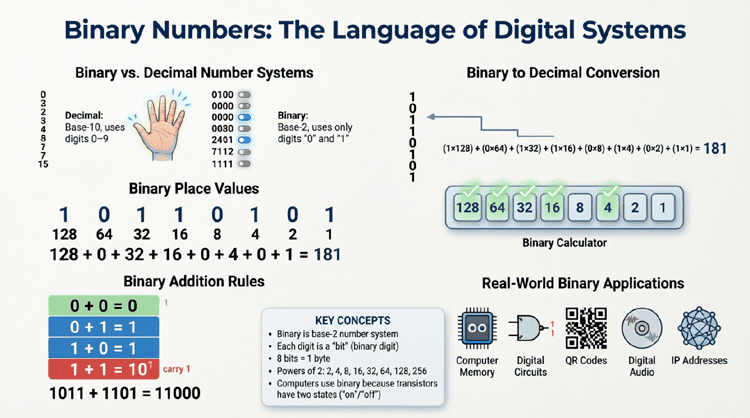
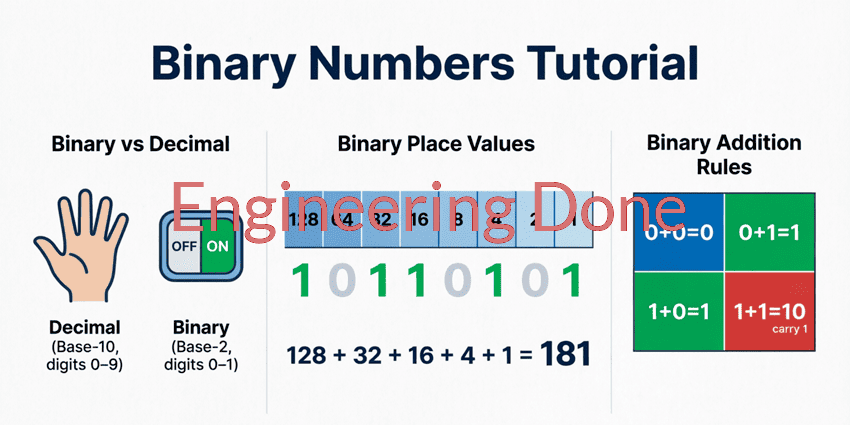
Binary addition follows four simple rules: 0 + 0 = 0, 0 + 1 = 1, 1 + 0 = 1, and 1 + 1 = 0 (carry 1 to the next column). If you have a carry-in from a previous column, 1 + 1 + 1 = 1 (carry 1). You process the columns from right to left, just like decimal addition.
Binary Addition
Binary addition is the most fundamental operation in digital computing. All other arithmetic operations in a computer’s ALU are ultimately built upon binary addition.
The Rules of Binary Addition
There are only four basic rules to memorize:
- 0 + 0 = 0 (Sum 0, Carry 0)
- 0 + 1 = 1 (Sum 1, Carry 0)
- 1 + 0 = 1 (Sum 1, Carry 0)
- 1 + 1 = 0 (Sum 0, Carry 1 to the next column)
- 1 + 1 + 1 = 1 (Sum 1, Carry 1 to the next column, if there is a carry-in)
Step-by-Step Example: Adding 1011 and 1101
Let’s add the binary numbers 1011 (11 in decimal) and 1101 (13 in decimal).
  Carry:   1 1 1 0
           1 0 1 1   (11 in decimal)
         + 1 1 0 1   (13 in decimal)
         ---------
         1 1 0 0 0   (24 in decimal)
Column-by-Column Breakdown (Right to Left):
- Column 1 (Rightmost): 1 + 1 = 0, carry 1.
- Column 2: 1 (carry) + 1 + 0 = 0, carry 1.
- Column 3: 1 (carry) + 0 + 1 = 0, carry 1.
- Column 4: 1 (carry) + 1 + 1 = 1, carry 1.
- Column 5: Bring down the final carry of 1.
Result: 11000, which equals 24 in decimal. The math checks out perfectly!
Binary Subtraction and 2’s Complement
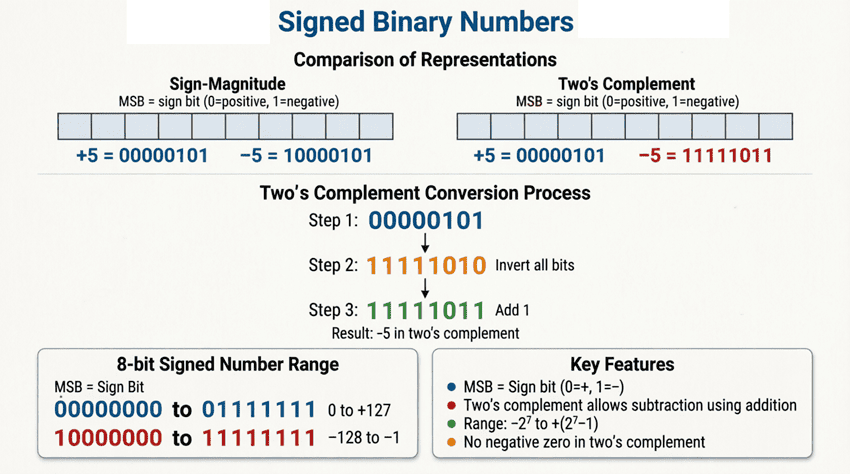
Subtraction in binary can be done using the traditional “borrowing” method, similar to decimal subtraction. However, computers rarely do this. Instead, they use a clever mathematical trick called 2’s complement to turn subtraction into addition. This saves hardware, as the ALU only needs an adder circuit, not a separate subtractor circuit.
The Rules of Binary Subtraction (Borrowing)
- 0 – 0 = 0
- 1 – 0 = 1
- 1 – 1 = 0
- 0 – 1 = 1 (Borrow 1 from the next left column, making it 10 – 1 = 1)
The 2’s Complement Method (How Computers Subtract)
To subtract $B$ from $A$ ($A – B$), computers calculate $A + (\text{2’s complement of } B)$.
Step-by-Step Guide to 2’s Complement:
- Start with the binary number you want to subtract (the subtrahend).
- Find the 1’s complement: Flip all the bits (change 0s to 1s, and 1s to 0s).
- Find the 2’s complement: Add 1 to the 1’s complement.
- Add this result to the first number (the minuend).
- Discard any final carry-out beyond the original bit length.
Step-by-Step Example: Subtract 0101 (5) from 1000 (8)
We want to calculate $8 – 5 = 3$. In binary: 1000 – 0101.
Step 1: Find the 2’s complement of 0101
- Original:
0101 - 1’s complement (flip bits):
1010 - Add 1:
1010+0001=1011(This is -5 in 2’s complement)
Step 2: Add to the minuend (1000)
    1 0 0 0   (8)
  + 1 0 1 1   (-5 in 2's complement)
  ---------
  1 0 0 1 1
Step 3: Discard the overflow carry
We are working with 4-bit numbers, so we discard the 5th bit (the leftmost 1).
The remaining 4 bits are 0011.
Result: 0011, which equals 3 in decimal. The math is correct!
What is 2’s complement?
2’s complement is a mathematical method used in computing to represent negative binary numbers and perform subtraction. It is found by inverting all the bits of a number (1’s complement) and then adding 1. This allows computers to use the same addition circuitry for both addition and subtraction.
Binary Multiplication
Binary multiplication is remarkably simple—simpler than decimal multiplication. Because the only digits are 0 and 1, the multiplication rules are identical to a logical AND operation:
- 0 × 0 = 0
- 0 × 1 = 0
- 1 × 0 = 0
- 1 × 1 = 1
The process is identical to long multiplication in decimal: you multiply each bit of the multiplier by the multiplicand, shift the result to the left for each subsequent bit, and then add the partial products together.
Step-by-Step Example: Multiply 101 (5) by 11 (3)
We want to calculate $5 \times 3 = 15$. In binary: 101 × 11.
        1 0 1   (Multiplicand: 5)
      ×   1 1   (Multiplier: 3)
      -------
        1 0 1   (101 × 1, no shift)
      1 0 1 0   (101 × 1, shifted left by 1)
      -------
      1 1 1 1   (Sum of partial products: 15)
Result: 1111, which equals 15 in decimal. Notice how the absence of carrying during the multiplication phase makes this incredibly fast for digital circuits to execute.
Binary Division
Binary division closely mirrors long division in the decimal system. However, because we only have 0s and 1s, the quotient can only ever be 0 or 1 at each step. You simply ask: “Can the divisor fit into the current portion of the dividend?” If yes, the quotient bit is 1; if no, it is 0.
Step-by-Step Example: Divide 1101 (13) by 101 (5)
We want to calculate $13 \div 5$. The quotient should be 2 (10 in binary) with a remainder of 3 (11 in binary).
          1 0   <-- Quotient
        -------
  1 0 1 ) 1 1 0 1   <-- Dividend
        - 1 0 1     <-- (101 fits into 110 once. 110 - 101 = 1)
        -------
            1 1     <-- Bring down the next bit (1), making it 11
          - 0 0     <-- (101 does not fit into 011, so quotient bit is 0)
        -------
            1 1     <-- Remainder
Result: Quotient = 10 (2), Remainder = 11 (3). The math holds up perfectly.
Practical Applications of Binary Arithmetic
Understanding these operations isn’t just an academic exercise; it is the foundation of modern computing.
1. The Arithmetic Logic Unit (ALU)
The ALU is the “calculator” inside a CPU. It is built entirely from logic gates (AND, OR, XOR, NOT) wired together to form “half-adders” and “full-adders.” By chaining 32 or 64 of these adders together, a modern processor can add massive binary numbers in a fraction of a nanosecond.
2. Checksums and Error Detection
When data is transmitted over the internet, binary addition is used to create a “checksum.” The sender adds up all the binary data packets and sends the sum along with the data. The receiver performs the same binary addition. If the sums match, the data arrived intact. If they don’t, an error occurred, and the data is re-requested.
3. Cryptography and Hashing
Modern encryption algorithms (like AES or SHA-256) rely heavily on binary arithmetic, particularly bitwise operations (XOR, shifts, and modular addition), to scramble data into an unreadable format that can only be unlocked with the correct key.
This binary numbers tutorial has demonstrated that while binary may look like a chaotic jumble of 1s and 0s to the untrained eye, the mathematics governing it are elegantly simple.
Key takeaways from this guide include:
- Binary Addition: Follows four simple rules, processing right to left with carries.
- Binary Subtraction: Computers use the 2’s complement method to turn subtraction into addition, saving hardware complexity.
- Binary Multiplication: Uses a simple “shift and add” method, as multiplying by 0 or 1 is trivial.
- Binary Division: Mirrors decimal long division, but the quotient bits are strictly 0 or 1.
- Real-World Impact: These operations are physically executed billions of times per second by the Arithmetic Logic Unit (ALU) in every computing device.
By mastering these fundamental operations, you have crossed the threshold from simply reading binary to actively manipulating it. You now understand the exact mathematical processes that occur inside a CPU every time you open an app, load a webpage, or play a game.