Binary to Decimal Conversion
Binary to Decimal Conversion Step-by-Step Guide
Introduction to Binary to Decimal Conversion
The fundamental concept of binary numbers—the base-2 language that computers use to process information. However, while computers “think” in binary, humans naturally think in decimal (base-10). Therefore, one of the most essential skills in digital electronics, computer science, and networking is the ability to seamlessly translate between these two systems.
Converting binary to decimal is the process of taking a sequence of 1s and 0s and determining its equivalent value in the standard base-10 number system we use every day. Whether you are calculating IP addresses for network subnetting, debugging microcontroller code, or simply trying to understand how a computer stores a number, mastering this conversion is a mandatory first step.
This comprehensive guide will break down the two most effective methods for converting binary integers to decimal, explain how to handle binary fractions, and provide clear, step-by-step examples to ensure you master the process.
How do you convert binary to decimal?
To convert a binary number to decimal, use the Positional Weight Method: Multiply each binary digit (bit) by its corresponding power of 2 (starting from $2^0$ on the right), and then add all the results together. Alternatively, use the Doubling Method: Start from the left-most bit, double your running total, and add the next bit, repeating until you reach the end.
The Positional Weight Method (Standard Approach)
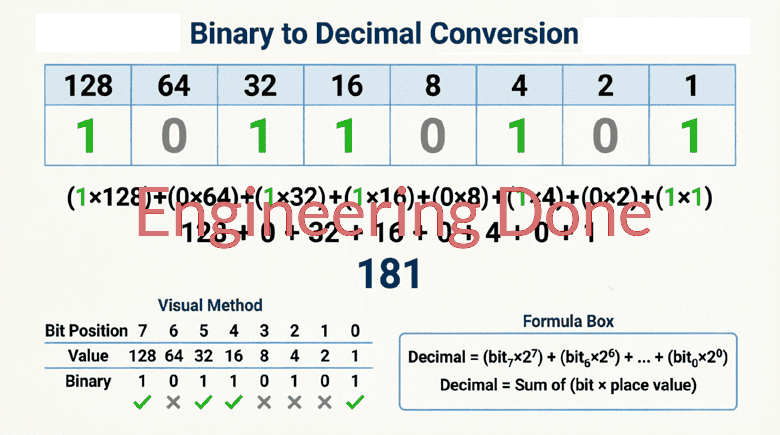
The most common and mathematically foundational way to convert binary to decimal is the Positional Weight Method. This method relies on the fact that every position in a binary number represents a specific power of 2.
Understanding the Weights
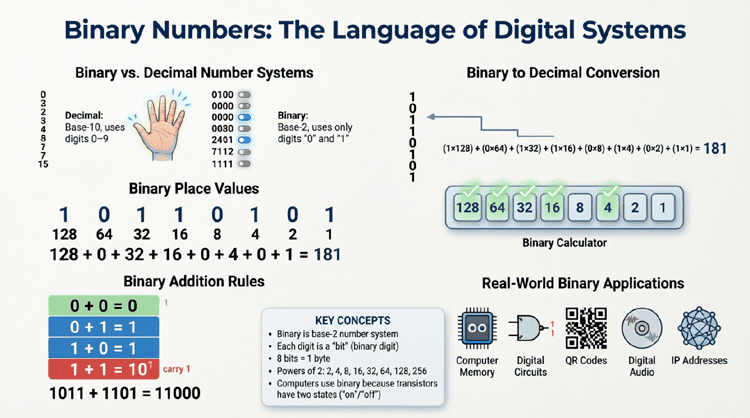
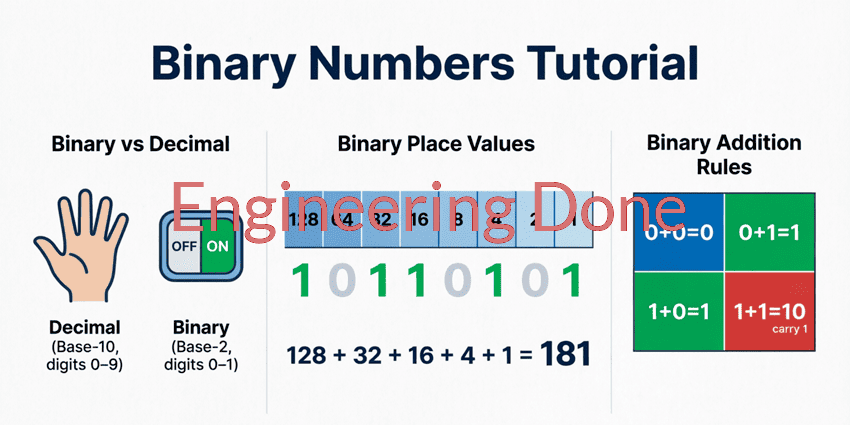
In a decimal number, the weights from right to left are 1, 10, 100, 1000, etc. In a binary number, the weights from right to left are 1, 2, 4, 8, 16, 32, 64, 128, etc.
The rightmost bit is the Least Significant Bit (LSB) and always has a weight of $2^0$ (which equals 1). As you move left, the exponent increases by one for each position.
Step-by-Step Guide
- Write down the binary number.
- Write the corresponding power of 2 under each bit, starting with $2^0$ on the far right and increasing to the left.
- Multiply each binary bit (0 or 1) by its positional weight.
- Add all the resulting values together to get the final decimal number.
Example 1: Converting an 8-Bit Binary Number
Let’s convert the 8-bit binary number 11010110 to decimal.
Step 1 & 2: Assign Positional Weights
Write the powers of 2 above the bits:
| Bit | 1 | 1 | 0 | 1 | 0 | 1 | 1 | 0 |
|---|---|---|---|---|---|---|---|---|
| Weight | $2^7$ | $2^6$ | $2^5$ | $2^4$ | $2^3$ | $2^2$ | $2^1$ | $2^0$ |
| Value | 128 | 64 | 32 | 16 | 8 | 4 | 2 | 1 |
Step 3: Multiply Bits by Weights
- $1 \times 128 = 128$
- $1 \times 64 = 64$
- $0 \times 32 = 0$ (Notice that any bit that is a 0 results in a 0, so we can ignore it)
- $1 \times 16 = 16$
- $0 \times 8 = 0$
- $1 \times 4 = 4$
- $1 \times 2 = 2$
- $0 \times 1 = 0$
Step 4: Add the Results
$128 + 64 + 16 + 4 + 2 = \mathbf{214}$
Result: The binary number $11010110_2$ is equal to 214 in decimal.
The Doubling Method (The “Double-Dabble” Approach)
While the positional weight method is great for understanding the math, it can be slow for long binary numbers because you have to remember all the powers of 2. The Doubling Method (sometimes called the Double-Dabble method) is a faster, left-to-right technique that requires no memorization of powers of 2.
Step-by-Step Guide
- Start with the leftmost bit (the Most Significant Bit). Your running total is simply this bit’s value (0 or 1).
- Move to the next bit to the right. Double your current running total, and add the current bit.
- Repeat step 2 until you have processed all the bits.
- The final running total is your decimal number.
Example 2: Converting 11010110 using the Doubling Method
Let’s convert the same number, 11010110, using this faster method.
- Start at the leftmost bit (1):
Running Total = 1 - Move to the next bit (1):
Double the total (1 × 2 = 2), add the bit (2 + 1 = 3).
Running Total = 3 - Move to the next bit (0):
Double the total (3 × 2 = 6), add the bit (6 + 0 = 6).
Running Total = 6 - Move to the next bit (1):
Double the total (6 × 2 = 12), add the bit (12 + 1 = 13).
Running Total = 13 - Move to the next bit (0):
Double the total (13 × 2 = 26), add the bit (26 + 0 = 26).
Running Total = 26 - Move to the next bit (1):
Double the total (26 × 2 = 52), add the bit (52 + 1 = 53).
Running Total = 53 - Move to the next bit (1):
Double the total (53 × 2 = 106), add the bit (106 + 1 = 107).
Running Total = 107 - Move to the final bit (0):
Double the total (107 × 2 = 214), add the bit (214 + 0 = 214).
Running Total = 214
Result: The final total is 214, perfectly matching our previous calculation! This method is highly favored by programmers and network engineers for quick mental math.
Converting Binary Fractions to Decimal
So far, we have only looked at whole numbers (integers). But what if there is a dot in the middle of the binary number? In binary, this dot is called the binary point (or radix point), and it separates the whole number portion from the fractional portion.
Understanding Fractional Weights
Just as the weights to the left of the binary point are positive powers of 2 ($2^0, 2^1, 2^2…$), the weights to the right of the binary point are negative powers of 2.
- The first position to the right is $2^{-1}$, which equals $\frac{1}{2}$ or 0.5.
- The second position is $2^{-2}$, which equals $\frac{1}{4}$ or 0.25.
- The third position is $2^{-3}$, which equals $\frac{1}{8}$ or 0.125.
- The fourth position is $2^{-4}$, which equals $\frac{1}{16}$ or 0.0625.
Example 3: Converting a Binary Fraction
Let’s convert the binary number 101.11 to decimal.
Step 1: Separate the Integer and Fractional Parts
- Integer part: 101
- Fractional part: .11
Step 2: Convert the Integer Part
Using the positional weights (4, 2, 1):
$(1 \times 4) + (0 \times 2) + (1 \times 1) = 4 + 0 + 1 = \mathbf{5}$
Step 3: Convert the Fractional Part
Using the fractional weights (0.5, 0.25):
$(1 \times 0.5) + (1 \times 0.25) = 0.5 + 0.25 = \mathbf{0.75}$
Step 4: Combine the Results
$5 + 0.75 = \mathbf{5.75}$
Result: The binary number $101.11_2$ is equal to 5.75 in decimal.
Common Mistakes to Avoid
When learning binary to decimal conversion, beginners often fall into a few common traps. Here is how to avoid them:
- Forgetting that $2^0 = 1$: The most common mistake is starting the powers of 2 at 2 instead of 1 on the far right. Always remember that the LSB (Least Significant Bit) has a weight of 1.
- Misaligning the Bits: When writing out the weights, ensure they perfectly align with the bits. A single misalignment will double or halve your final answer.
- Confusing Binary 10 with Decimal 10: In binary, “10” means “two” in decimal. Always use a subscript to clarify, such as $10_2$ (binary) vs $10_{10}$ (decimal), especially when writing out equations.
- Adding Instead of Multiplying in the Doubling Method: In the doubling method, you must double the running total and then add the bit. A common error is doubling the bit itself, rather than the accumulated total.
Practical Applications of Binary to Decimal Conversion
Why do we need to do this manually when computers can do it instantly? Understanding the conversion process is vital for several real-world technical tasks:
1. IP Addressing and Subnetting
In computer networking, IPv4 addresses are 32-bit binary numbers. However, they are written in “dotted decimal” notation (e.g., 192.168.1.1) for human readability. Network engineers must constantly convert between binary and decimal to calculate subnet masks, determine network boundaries, and troubleshoot routing issues.
2. Microcontroller and Embedded Programming
When programming microcontrollers (like Arduino or PIC chips), engineers often manipulate hardware registers directly. These registers are 8-bit or 16-bit binary numbers. To set specific pins high or low, the programmer must understand what decimal value corresponds to the desired binary bit pattern.
3. Digital Electronics and Logic Design
When designing digital circuits, engineers use truth tables and Karnaugh maps, which rely heavily on binary inputs and outputs. Converting these to decimal helps in verifying circuit behavior and calculating timing delays.
4. Color Codes in Web Design
While web colors are usually represented in Hexadecimal, Hex is directly tied to binary (each Hex digit represents 4 bits). Understanding binary-to-decimal conversion helps developers understand how RGB color values (which range from 0 to 255) are constructed at the machine level.
Converting binary to decimal is a foundational skill that bridges the gap between human logic and machine language. By understanding that every bit in a binary number represents a specific power of 2, you can easily translate any sequence of 1s and 0s into a familiar base-10 number.
Key takeaways from this guide include:
- Positional Weight Method: Multiply each bit by its corresponding power of 2 (from right to left: 1, 2, 4, 8…) and sum the results.
- Doubling Method: A faster, left-to-right mental math trick where you double your running total and add the next bit.
- Binary Fractions: Bits to the right of the binary point represent negative powers of 2 (0.5, 0.25, 0.125…).
- Practical Use: This skill is essential for network subnetting, embedded programming, and digital logic design.
With these two methods in your toolkit, you can confidently convert any binary integer or fraction into its decimal equivalent.